Live event streams
You can stream events (sign-ups, logins, machine-to-machine tokens issued, and many more) in real-time, live as they happen in your Ory Network project, to your own infrastructure. Pipe those events into your own data warehouse, data lake, or flavor of choice, and use them to power your own analytics, dashboards, data science, and more.
Live event streams are available for Ory Network enterprise contracts. Talk to your account manager or reach out directly.
Event shape
Ory emits events for many different actions. All events abide by the same schema:
{
  "name": string,       // The unique name of the event (e.g., "IdentityCreated").
  "version": string,     // The numerical schema version of the event as a string.
  "timestamp": string,  // ISO 8601 formatted timestamp when the event occurred.
  "projectId": string,  // The ID of the Ory project the event belongs to.
  "eventAttributes": map<string, string> // Additional event-specific attributes.
}
Example:
{
  "name": "WebhookSucceeded",
  "version": "1",
  "timestamp": "2025-05-16 11:18:56",
  "eventAttributes": {
    "GeoLocationCity": "Munich",
    "WebhookID": "",
    "WebhookTriggerID": "18093e08-0f72-445f-aacb-151fc777a232"
  }
}
Important:
- Per the JSON specification, ordering of keys in objects is not guaranteed and should not be relied upon.
- New keys can appear at any time, consumers should be designed to handle this.
- The exact content in the
eventAttributesfield is not documented and not considered stable. That means that no backwards compatibility guarantees are made for them.
If you intend to write a consumer that needs a detailed schema and stability guarantees about the eventAttributes field, please
open a support ticket.
Event names
The following is a list of all events that are currently supported. The first column corresponds to the name field in an event.
New event names may be added in the future, in which case this list will be updated accordingly.
Ory Identities
| Event | Description |
|---|---|
| IdentityCreated | A new identity (user or account) has been created. |
| IdentityDeleted | An identity has been deleted from the system. |
| IdentityUpdated | An existing identity's details have been modified or updated. The IdentityActive attribute in the event indicates the state of the active flag, as many SCIM providers deactivate users by setting active=false. |
| JsonnetMappingFailed | Mapping claims or attributes from an OIDC or SAML IdP failed. |
| LoginFailed | A user's login attempt has failed, possibly due to incorrect credentials. |
| LoginInitiated | A new login flow has been created and basic validation passed. |
| LoginSucceeded | A user has logged into their account. |
| RecoveryFailed | A password or account recovery attempt has failed. |
| RecoveryInitiatedByAdmin | An admin has initiated account recovery on behalf of a user. |
| RecoverySucceeded | A password or account recovery attempt has succeeded. |
| RegistrationFailed | A user's attempt to register has failed due to errors or invalid data. |
| RegistrationInitiated | A new registration flow has been created and basic validation passed. |
| RegistrationSucceeded | A user has registered and created an account. |
| SCIMGroupCreated | A new SCIM group has been created. Includes ScimClient attribute. |
| SCIMGroupDeleted | A SCIM group has been deleted. This event will also trigger IdentityUpdated events for all affected users. Includes ScimClient attribute. |
| SCIMGroupUpdated | A SCIM group has been updated. Modifying members of a group will also emit IdentityUpdated events for all affected users. Includes ScimClient attribute. |
| SCIMProvisioningError | An error occurred during the SCIM provisioning process, check the SCIMError Detail attribute for more information. |
| SessionChanged | A sessions details have been modified or updated. |
| SessionChecked | A check has been performed to verify the session's validity or status. |
| SessionIssued | A new session has been initiated for a user. |
| SessionLifespanExtended | The duration of a session has been extended, allowing the user to remain authenticated longer. |
| SessionRevoked | A session has been explicitly terminated or invalidated. |
| SessionTokenizedAsJWT | A session has been converted into a JSON Web Token (JWT). |
| SettingsFailed | An attempt to change account or session settings has failed. |
| SettingsSucceeded | An attempt to change account or session settings has succeeded. |
| VerificationFailed | A user's identity verification attempt has failed. |
| VerificationSucceeded | A user's identity verification has succeeded. |
| WebhookDelivered | A webhook has been sent to the configured endpoint for processing. |
| WebhookFailed | A webhook delivery or processing has failed at the receiving endpoint. |
| WebhookSucceeded | A webhook has been processed and acknowledged by the receiving endpoint. |
| CourierMessageAbandoned | A courier message has been abandoned. |
| CourierMessageDispatched | A courier message has been dispatched. |
Ory OAuth2
| Event | Description |
|---|---|
| OAuth2LoginAccepted | A user's OAuth2 login has been accepted and the authentication process has succeeded. |
| OAuth2LoginRejected | A user's OAuth2 login attempt has been rejected due to invalid credentials or authorization issues. |
| OAuth2ConsentAccepted | The user has accepted the consent screen, granting requested permissions to the OAuth2 client. |
| OAuth2ConsentRejected | The user has rejected the consent screen, refusing to grant the requested permissions. |
| OAuth2ConsentRevoked | The user has revoked previously granted consent for an OAuth2 client, removing its permissions. |
| OAuth2ClientCreated | A new OAuth2 client (application) has been created and registered in the system. |
| OAuth2ClientDeleted | An OAuth2 client has been deleted from the system. |
| OAuth2ClientUpdated | An existing OAuth2 client's details have been updated or modified. |
| OAuth2AccessTokenIssued | An OAuth2 access token has been issued to a client or user. |
| OAuth2TokenExchangeError | An error occurred during the OAuth2 token exchange process, possibly due to invalid requests. |
| OAuth2AccessTokenInspected | An OAuth2 access token has been inspected to verify its validity or check its claims. |
| OAuth2AccessTokenRevoked | An OAuth2 access token has been revoked, invalidating it for future use. |
| OAuth2RefreshTokenIssued | A refresh token has been issued, allowing the client to obtain a new access token. |
| OIDCIdentityTokenIssued | An OpenID Connect (OIDC) identity token has been issued to authenticate the user's identity. |
Ory Permissions
| Event | Description |
|---|---|
| RelationtuplesCreated | A new relation tuple has been created, representing a relationship between entities. |
| RelationtuplesDeleted | An existing relation tuple has been deleted, removing the relationship between entities. |
| RelationtuplesChanged | A relation tuple has been modified, indicating a change in the relationship between entities. |
| PermissionsExpanded | Permissions have been expanded, likely increasing access or privileges for certain users or entities. |
| PermissionsChecked | A permission check has been performed to verify if access is allowed for a given action or resource. |
Ory Network
| Event | Description |
|---|---|
| ProjectCreated | A project was created. |
| ProjectUpdated | A project was updated. |
| ProjectDeleted | A project was deleted. |
| StripeSubscriptionUpdated | A Stripe subscription was updated. |
| APIKeyCreated | An API key was created. |
| APIKeyDeleted | An API key was deleted. |
| CustomDomainCreated | A custom domain was created for a project. |
| CustomDomainDeleted | A custom domain was deleted from a project. |
| CustomDomainUpdated | A custom domain was updated. |
| ProjectMemberInviteCreated | An invitation for a project member was created. |
| ProjectMemberInviteAccepted | A project member invitation was accepted. |
| ProjectMemberInviteCancelled | A project member invitation was canceled. |
| ProjectMemberInviteDeclined | A project member invitation was declined. |
| ProjectMemberInviteDeleted | A project member invitation was deleted. |
| ProjectMemberRemoved | A member was removed from a project. |
| OrganizationOnboardingPortalLinkCreated | An onboarding link for an organization was created. |
| OrganizationOnboardingPortalLinkCreated | An onboarding link for an organization was created. |
| OrganizationOnboardingPortalLinkDeleted | An onboarding link for an organization was deleted. |
| OrganizationOnboardingPortalLinkUpdated | An onboarding link for an organization was updated. |
| SAMLProviderCreated | A SAML provider was created. |
| SAMLProviderDeleted | A SAML provider was deleted. |
| SAMLProviderUpdated | A SAML provider was updated. |
| OIDCProviderCreated | An OIDC provider was created. |
| OIDCProviderDeleted | An OIDC provider was deleted. |
| OIDCProviderUpdated | An OIDC provider was updated. |
| SCIMClientCreated | A SCIM client was created. |
| SCIMClientDeleted | A SCIM client was deleted. |
| SCIMClientUpdated | A SCIM client was updated. |
Delivery guarantees
- Possible duplicates: There might be duplicates in the event stream. While rare (typically caused by retries because of network issues), consumers should be prepared to deal with them, for example by implementing deduplication logic.
- Best-effort delivery: Event delivery is best-effort. While most events are delivered reliably, events may be lost under adverse conditions (for example, system crashes during request processing). Delivery is not guaranteed to be "at-least-once".
- No delivery latency SLA: Ory does not offer a Service Level Agreement (SLA) for event delivery duration (the time between an event occurring and it appearing in your consumer or the Ory Console UI). However, typical delivery times are observed to be less than 5 seconds.
- No ordering guarantees: Events may arrive in any order, both within a request and across different requests.
Stronger guarantees can be implemented for your use case if needed, in this case please open a support ticket.
Configure event streams
Is your workload not running on AWS or you don't want to use SNS? Reach out to discuss your requirements! Event streams can be implemented for any data warehouse, data lake, or equivalent solution.
Stream to HTTPS endpoint
To stream events to an HTTPS endpoint, provide the URL of the endpoint when configuring the event stream:
- Ory Console
- Ory CLI
-
Go to your project in the Ory Console.
-
Click Project settings in the top navigation bar.
-
Click Event streams in the left sidebar.
-
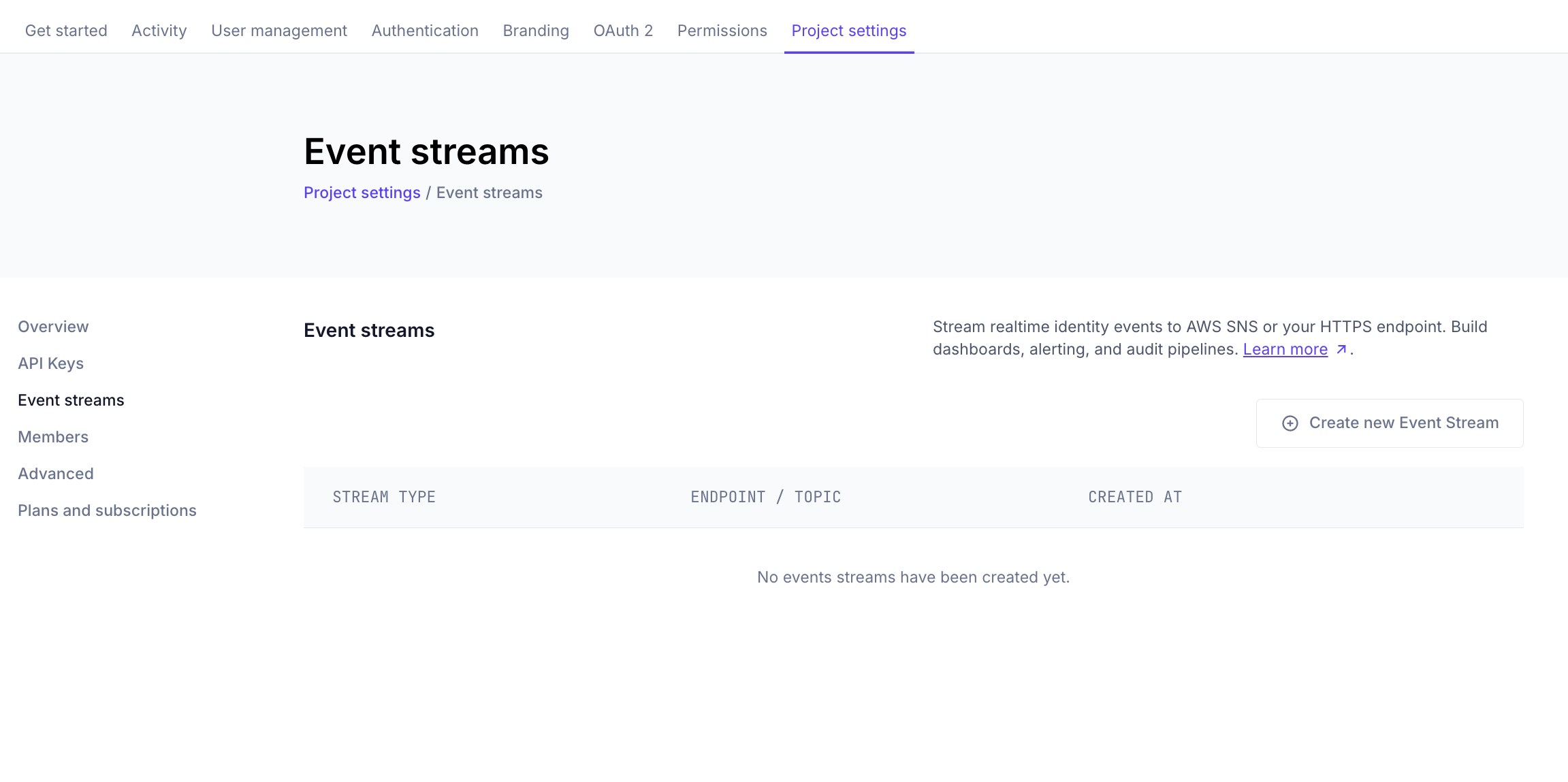
Click Create new Event Stream.
-
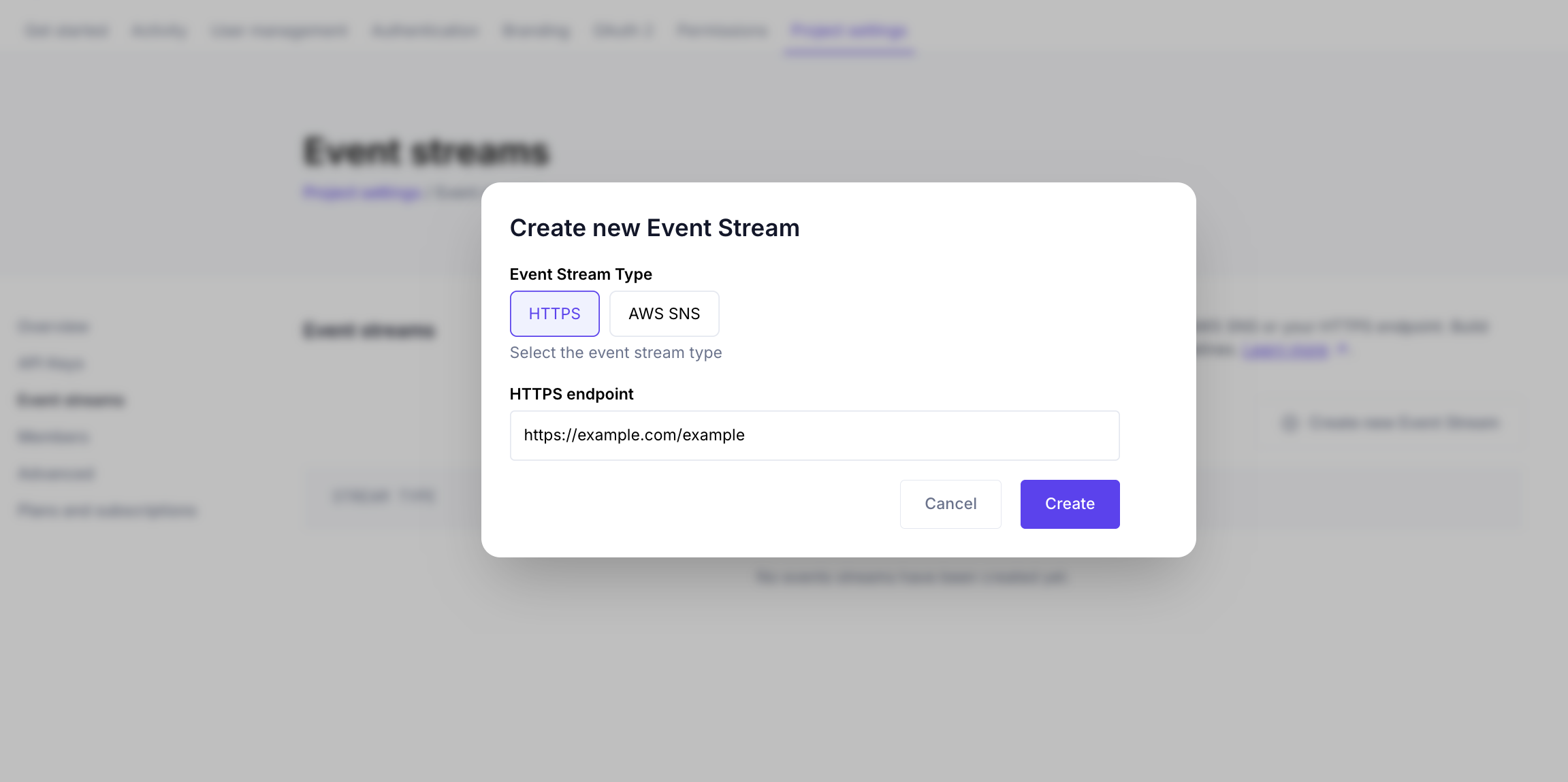
In the Create new Event Stream dialog:
-
Event Stream Type — Select HTTPS.
-
HTTPS endpoint — Enter the URL of your endpoint, for example
https://example.com/my-event-endpoint.
-
-
Click Create. The new stream appears in the event streams table.
ory create event-stream
  --project "$YOUR_PROJECT_ID" \
  --type https \
  --https-endpoint https://example.com/my-event-endpoint
Unencrypted HTTP endpoints are not supported. Your endpoint must be able to handle POST requests with a JSON body, and respond with a 2xx status code to acknowledge successful processing of the event. HTTP redirects are not followed and are treated as delivery failures.
Authentication is possible by including credentials in the URL (HTTP Basic Authentication), for example:
https://username:password@example/com/my-event-endpoint
Stream to AWS SNS
Configuring AWS SNS as an event stream destination is easy and requires no exchange of confidential information.
- Create an AWS SNS topic, and record its ARN (Amazon Resource Name), for example:
arn:aws:sns:us-east-1:123456789012:my-topic
- Create an AWS IAM role with publish permission to that topic. Sample IAM policy:
{
  "Version": "2012-10-17",
  "Statement": [
    {
      "Sid": "OryNetworkEventStreamPublish",
      "Effect": "Allow",
      "Action": ["sns:Publish"],
      "Resource": ["<YOUR TOPIC ARN>"]
    }
  ]
}
Record the ARN of the IAM role you created, for example:
arn:aws:iam::123456789012:role/ory-network-event-streamer
- Attach the following trust policy to the IAM role you created in step 2, replacing
<YOUR PROJECT UUID>with your project ID:
{
  "Version": "2012-10-17",
  "Statement": [
    {
      "Effect": "Allow",
      "Principal": {
        "AWS": "601538168777"
      },
      "Action": "sts:AssumeRole",
      "Condition": {
        "StringEquals": {
          "sts:ExternalId": "<YOUR PROJECT UUID>"
        }
      }
    }
  ]
}
This allows Ory Network to assume the role in your AWS account, and publish to your SNS topic.
-
Configure the event stream, replacing the ARNs with those recorded in steps 1 and 2:
- Ory Console
- Ory CLI
a. Go to your project in the Ory Console.
b. Click Project settings in the top navigation bar.
c. Click Event streams in the left sidebar.
d. Click Create new Event Stream.
e. In the Create new Event Stream dialog:
-
Event Stream Type — Select AWS SNS.
-
Role ARN — Paste the IAM role ARN from step 2.
-
Topic ARN — Paste the SNS topic ARN from step 1.
f. Click Create. The new stream appears in the event streams table.
https://console.ory.com/projects/b3b748e5-7ddc-4860-a672-2436a877dc93/settings/event-streams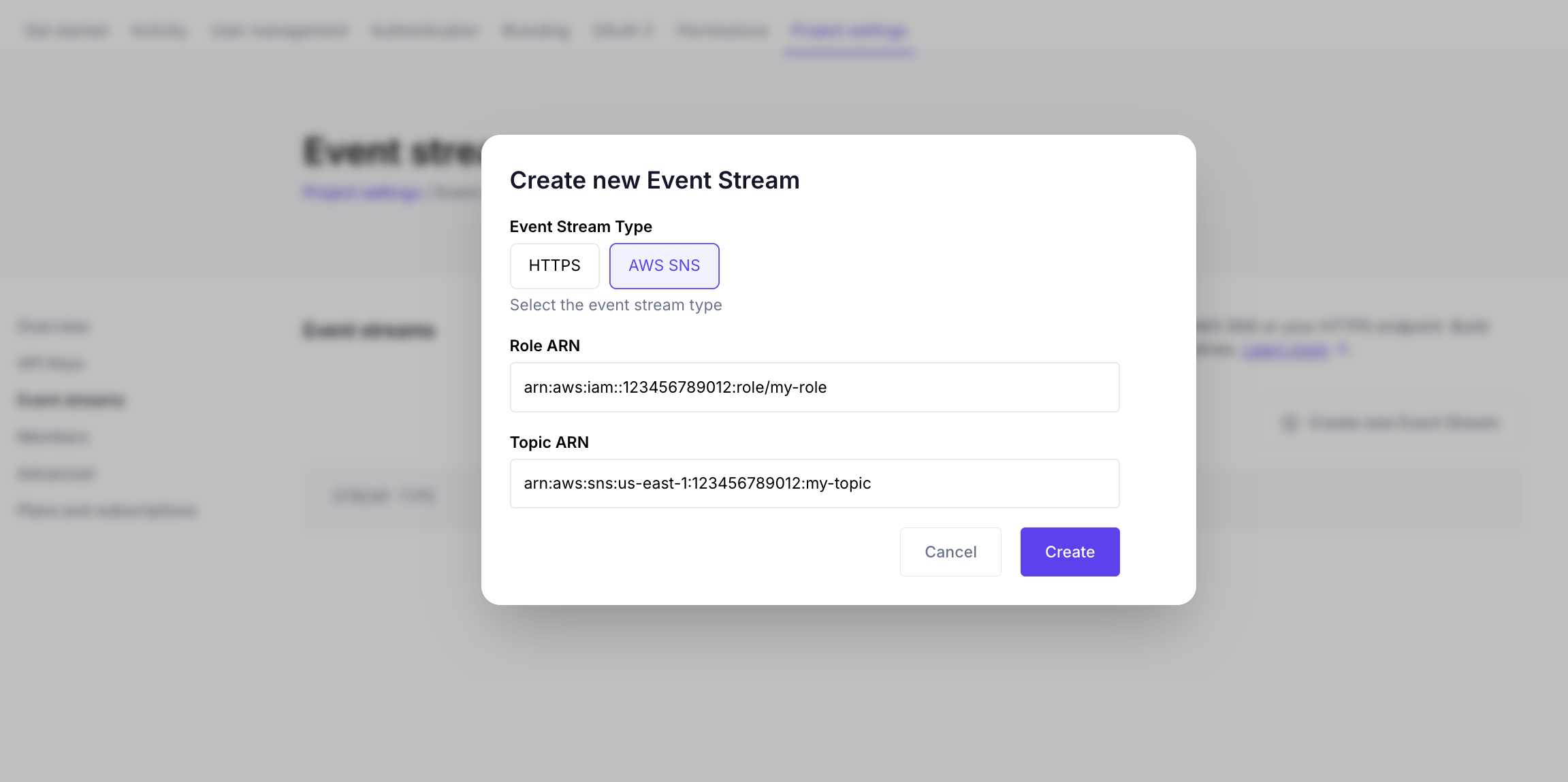 ory create event-stream--project "$YOUR_PROJECT_ID" \--type sns \--aws-sns-topic-arn "$YOUR_TOPIC_ARN" \--aws-iam-role-arn "$YOUR_IAM_ROLE_ARN"
 -
You are now ready to receive events in your AWS SNS topic!
For development purposes, you can subscribe an email address to your topic, and receive events via email. For production use, subscribe AWS SQS, AWS Kinesis Data Firehose, or any other AWS service that can consume events from an SNS topic. Check the AWS documentation for ideas.
Pause and resume event streams
You can pause an event stream to temporarily stop delivering events to its destination without deleting the stream or its configuration. Pause a stream while its destination is undergoing maintenance, is misconfigured, or is being replaced, then resume it to continue delivery. Pausing one event stream has no effect on your other event streams.
Pause or resume a stream
- Go to your project in the Ory Console.
- Click Project settings in the top navigation bar.
- Click Event streams in the left sidebar. The Status column shows whether each stream is Active or Paused.
- Open the ⋯ menu next to the stream and click Pause or Resume.
You can also change the status through the Ory APIs. Updating an event stream is a partial update: send only the status field
(active or paused) and every other setting keeps its current value. This is the recommended way to pause or resume a stream,
because resubmitting the destination is not required.
When you resume a stream, Ory first verifies that the destination is reachable, the same check that runs when you create or update a stream.
Create a stream as paused
When you create a stream in the Ory Console, set Status to Paused to save it without starting delivery. This is useful when you want to configure a stream before its destination is ready. Resume it later from the stream's ⋯ menu.
What happens to events while a stream is paused
In short: while a stream is paused Ory keeps receiving your project's events and buffers them for that stream for up to 7 days. Resume within that window and Ory delivers everything that was buffered while the stream was paused.
In more detail:
- Pausing only stops delivery. Ory keeps collecting the events your project produces and holds them in an internal buffer dedicated to that stream. Nothing is delivered to your destination while the stream is paused.
- Buffered events are retained for up to 7 days. When you resume the stream, Ory delivers the buffered backlog first and then continues with new events. This catch-up delivery follows the same guarantees as normal delivery: best-effort, possibly out of order, and possibly with duplicates.
- Events that have been buffered for longer than 7 days are permanently discarded, whether or not you resume the stream. A stream that stays paused for more than 7 days keeps only the most recent 7 days of events; anything older is lost.
Pausing one stream does not affect your other event streams, and does not affect events available elsewhere in Ory, such as the project's activity view in the Ory Console.
Pausing buffers events for up to 7 days. If a stream stays paused for longer, the oldest events are permanently lost. Resume the stream within 7 days to receive everything you missed.
Retry policy
If your event stream destination is unavailable or misconfigured, Ory Network will retry sending the event multiple times with an exponential backoff between attempts.